NAVIGATION
Pay invoices, change payment details, and view your current registrations in your Profile.
View Profile
Pay for Consumables
Donate
ADDITIONAL LINKS
Member Handbook
Tool Manuals
Wiki
Get Help with an Incident
Change Password
Not seeing the event you're looking for? Check out the full calendar!
Questions or trouble signing up for this class? Email ceramics@tcmaker.org.
Through this 6-week intermediate hand-building course, students will deepen their knowledge of clay through presentation on pottery terminology, technical processes, and hands-on projects and activities.
Topics covered include types of clay and when to use them, clay harvesting and production, cones (what are they?), slump and hump molds, intermediate surface decoration techniques (mishima, slip marbeling, etc.), and hand-building functional ware.
The skills acquired in this course will serve as a continuation of your hand-building foundation on which you may take more advanced classes and/or learn in open studio time.
Come ready to get messy. Wear clothes you don't mind getting dirty; don't worry about clay on your clothes - it washes right off! Most importantly, come ready to have fun!
3D Printing Lab orientation and beginner class
After registration for this orientation, we require completion of the course located at: https://www.prusa3d.com/product/3d-printing-and-modeling-for-beginners-mk3s/ use the coupon code on the course description to get it for 50 cents
This will teach you how to print on our Prusa I3 MK3S+ machines. Presenting the certificate of completion to us will serve as your check-off for being allowed to use the printers at the shop. Please skip to section 3 when you purchase the course.
In this class we will go over the 3D printing lab space and review your certification so that you are checked off for the use of printers. Please ask us any questions you have and share your passions with us. We're excited to help you get started on this journey!
If you have a file that you would like to print, bring it with and we would be more than happy to assist you in getting started on your first 3D print.
Please note that if you arrive without having taken this class, you will not be checked off for the use of the lab until it is complete. If there is any reason you are unable to complete this class due to lack of access to a computer or smartphone, or any other reason. We are more than happy to teach you regardless, just reach out to our email.
If you're a Twin Cities Maker member: once completed, the Intermediate tier of training opens up for you for the use of the Bambu machines. Please see the calendar for Intermediate training.
Any questions about this class or need assistance with training please contact 3D@tcmaker.org Happy Making!
*Please Note: Ignore the "Spaces Left" on this Event. It will always show Zero!
This four step process includes: sign up, training video, practice quiz, and an in-person written and practical test on the laser.
Whether you are a brand new member of Twin Cities Maker, or have been a member for a really long time but haven't been in the shop for awhile, attending a new member orientation will get you up to speed on the policies, guidelines, and culture of Twin Cities Maker.
Signup, download a copy of our handbook, and come to session. During orientation you get to meet some new people, have all your questions answered, and get acquainted with Twin Cities Maker policies, guidelines, and culture.
Orientation lasts for about 1 hour with time after for questions and support for any issues.
After you have completed orientation you will receive your fob to access the facility, which will be activated once have paid all membership fees.
If you are going to be working in the woodshop be sure to sign up for woodshop orientation immediately following this class. Check our orientations calendar to register.
All New Members are required to Pre-Register for this Orientation.
If you cannot attend an in person orientation, please reach out to membership@tcmaker.org so that we can work out special arrangements.
Wood Shop Orientation is a required orientation for all woodworkers.
During Orientation we will cover basic shop safety guidelines along with best practices that are necessary to use the wood shop at Twin Cities Maker!
https://wiki.tcmaker.org/en/shop_departments/wood_shop
NOTE: This event is open to studio members and non-studio members alike.
Questions or trouble signing up? Email ceramics@tcmaker.org
Become a steward of the ceramics studio! Help us foster an environment of collective care as we clean the studio, maintain tools, and complete studio improvements. We are all volunteers, and appreciate your time and effort to maintain the space we love.
- Your TCM Ceramics Managers
Create with clay! Come get your hands a little dirty and create your own magical gnome. Join Lynn Cardwell for this fun workshop. Various templates, tools, textures, and colored slips will be available for you to choose from. Adults and children are welcome. Class size is limited so register early!
Great for parents and kids!
Lapidary shop orientation will get new members to the shop familiar with the equipment, the capabilities of the shop, and the dos and don'ts of the space. No personal PPE is required, but a pair of wrap-around goggles/safety glasses and a smock/apron are recommended. A dust mask may also be worn, though all tools are run with coolant to minimize dust.
This class will provide wood shop users with foundational skills in woodworking including planning, materials, marking, skills, and tool use.
Students will be introduced to the TC Maker wood shop mindset and safety expectations. Learn how to plan a successful project with a focus on construction methods and joinery. Select wood, measure and mill materials, and learn order of operations and assembly. Finally, we'll cover wood finishing including finish options and technique.
Each of the four sessions will last two hours and start with a lesson portion. If we have any extra time, the instructors can help answer questions and consult on projects.
The workbench, clamps, vices, measuring tools, squares, chisel, hand plane, bandsaw, table saw, jointer, planer, sanding station, and more.
Clothing suitable to the wood shop. Wear close-toed shoes and avoid loose, dangling clothing and accessories.
Eye and hearing protection is required. Dust masks and eye/ear protection are available to borrow but bringing your own is recommended.
Orientation will be a half-hour session covering space changes, equipment and material locations, donations, cleanliness protocols, and safety procedures for new members and those who haven't been down to the Artifactory in a while.
3D Printing FDM Intermediate Class In this class students will be going over more complex scenarios and settings with modern 3D printing. Students will get hands on experience with the labs Bambu printers and go through it's hardware and get troubleshooting training. On top of more advanced settings and introduction to multi-color printing without AMS systems. For TCM Members: This training will also setup each person with their own accounts to get access to the printers and how to use the farming software. Any questions reach out to 3D@tcmaker.org
Learn JavaScript while making algorithmic artwork!
During class, we'll generate SVGs using JavaScript and the library p5js! You'll get the chance to explore different functions, like random and noise to create fun and surprising outputs. Afterward, you'll have learned the basics of using a pen plotter and will take home a small plotted piece of art that you design!
Able to use a web browser and type confidently. No coding experience required!
Your own laptop and charger.
Eric Lewiston is an artist and engineer who has been making algorithmic art for four years. He uses pen plotters as his primary collaborators in making physical versions of his digital art. His work has been featured at Burl Gallery, Duluth Art Institute, MN Nice Art, Glen Arbor Arts Center, and more! He can be found in Studio #406 in the Northrup King Building during open studio times.
NOTE: *This class is required for ceramics studio members who do not pass or do not attempt the wheel-throwing sign-off. Members must either pass the wheel-throwing sign off or take the 101 course to wheel throw in our studio. Thank you!*
This class is centered around the potter's wheel. Students will understand the basic tools and materials as well as proper studio safety and clean-up practices. Students will learn to prepare clay for throwing, center the clay on the wheel, open and pull clay walls, and create basic forms like cylinders and bowls. Finally, students will learn how to refine and trim forms, apply surface decoration and glaze, and understand the process of bisque and glaze firing.
The skills acquired in this class will the the foundation on which you can keep building with more advanced classes and/or open studio time.
Come learn about the jewelry bench! You will learn: each tool’s role in the jewelry-making process, from cutting and forming to soldering and polishing. We will cover fabrication/smithing workflows as well as casting.
Curious about 3D printing? Want to make organizers, replacement parts, cosplay props, custom brackets, mounts, prototypes, or just something fun you found online? This is your starting point.
No previous 3D printing experience needed. Just bring your curiosity.
After registering, please complete this free Prusa course before class: https://www.prusa3d.com/product/3d-printing-and-modeling-for-beginners-mk3s/
Enter the coupon code listed on the course page and skip to Section 3. Bring your certificate to class. Showing it on your phone is perfectly fine.
Course completion is REQUIRED so we can check you off for printer access.
No computer or smartphone to take the course? Just email 3D@tcmaker.org and we will make it work.
In this hands-on session, we will walk through how the 3D lab works, go over shared space guidelines, and guide you step-by-step through printing on our Prusa i3 MK3S printer. Bring an STL file if you have one you are excited about, or use one of ours. If your print does not finish during class, you can pick it up later. Filament for training prints is provided.
By the end, you will be officially checked off and ready to use the Prusa printers on your own.
Open to both members and non-members. If you have printed before, you are still welcome to join. You can also email us about scheduling a quick 30-minute check-off session.
Want to go further? After this class, members can take intermediate training to unlock our Bambu X1C with AMS and P1S printers. We also run a monthly resin class for the Anycubic Photon M5S Pro printer. 3D scanner training for the Creality Raptor Pro is available upon request.
If the class is full, reach out and we will try to schedule a 1:1 session depending on availability.
Got any questions or need assistance? Email us at 3D@tcmaker.org and we are happy to help.
We cannot wait to see what you make. Happy making!
Learn some basic CAD to create objects, no experience necessary. We'll use an example of a tool holder to practice making a sketch and constraining it to specific measurements. We'll also practice getting it out of CAD and onto a 3D printer or CNC machine. We will demonstrate with OnShape which is a web based program that can run on almost any device. For most effective class time, please come with a device and a free onshape account.
Daniel Hoisington has worked at Augsburg and St Thomas and now teaches extra curricular STEM subjects to middle and high school students. In his free time he enjoys making math manipulatives and biking.
Learn the basics of MIG welding and walk away with your own small wall-mounted coat hanger. In this class you will learn a basic welding framework to use on your own projects at home or in the TC Maker shop. Safety, machine basics, gas choice and set-up, as well as basic tools will all be covered. For folks starting from zero knowledge to those who have welded in the past and would like to brush-up, this class emphasizes that everyone can be a welder and make their own project dreams come true. Class size is kept small to encourage participation and time with the instructor.
Participants should be wearing close-toed shoes and clothing that is 100% cotton or wool. Jeans or similar material without holes are also required. No synthetic fibers. Improper attire may require participants to withdraw at time of class without refund. If you have questions regarding proper attire, please reach out to the instructor.
Welding jackets and hoods are provided.
Cory Due is a Local 53p pipefitter who attended MCTC's welding program. They enjoy making learning fun and welcoming for anyone willing to get in and try!
This is a workshop for people who have never started a seed in their life to people who have a mini-nursery in their basement and everyone in between. This collaborative event is to provide space for people to get ideas, trade any seeds they may have, and get excited about the wonderful world of gardening. Hosts will provide some materials on what it takes to start seeds, how to be successful, stories of failure, and a yearning for the warm times.
Just bring yourself, your ideas, and if you so desire, a beverage or snack to share!
Class fee goes to TC Maker.
When Cory is not working or tending to their menagerie of animals, they're plotting and scheming for the biggest, most productive and beautiful garden of their dreams.
NOTE: *You must attend the general Twin Cities Maker Orientation ("New Member Orientation") in addition to our Ceramics Studio Orientation.*
Questions or trouble signing up for this orientation? Email ceramics@tcmaker.org
The general orientation will orient you with the makerspace as a whole, while our ceramics studio orientation will focus specifically on the processes and procedures in our shop. We recommend completing the general orientation before the ceramics orientation. You do not need to attend orientation before taking a class or workshop. However, orientation is a requirement to keep using the studio after a class or workshop ends.
Our ceramics orientation will cover:
Come prepared to ask questions and have fun!
Curious about high-detail 3D printing? Want to print miniatures, detailed models, jewelry prototypes, or parts with smooth finishes? This is a great place to explore resin printing.
In this hands-on session, we’ll walk through the complete resin workflow using our Anycubic Photon M5S Pro printers. You’ll learn printer setup, file preparation, washing and curing, and safe cleanup practices so you feel confident working with resin.
If you’ve used filament printers before, the process will feel familiar, just a bit messier.
Resin printing can have a noticeable smell, and we provide the necessary PPE, including gloves and masks.
You do not need to complete the Beginner or Intermediate filament classes before attending. If you’re all new to 3D printing, we recommend starting with our 3D Printing Lab Orientation and Beginner Class to learn filament printing on the Prusa i3 MK3S printers. The Intermediate class unlocks access to the Bambu X1C (with AMS) and P1S printers.
If resin printing is what excites you most, feel free to jump right in and register.
By the end of the session, you’ll be checked off to use the Anycubic Photon M5S Pro independently.
We also offer 3D scanner training for the Creality Raptor Pro upon request.
If the class is full, reach out and we’ll try to schedule a 1:1 session depending on availability.
Got questions? Email 3D@tcmaker.org and we’re happy to help.
After this class you'll have a general understanding of how to operate the screen printing equipment along with the basic principles of screen printing.
Besides learning about the screen printing equipment, you'll learn about shop policies & safety, practical applications of screen printing, how to chose a good image for screen printing, and acceptable surfaces that will screen print well.
Rick Strohmeyer has been a long time member of Twin Cities Maker. After receiving his Bachelor of Fine Arets in printmaking, he has enjoyed sharing his knowledge he has learned while being a a print-maker, painter and general designer.
Become a pipe solder savant, or at least learn enough to repair and make new solder connections in your house. In this class you’ll learn how to pick out your materials, types of fittings, types of copper piping, and how to make solder connections you feel secure about. Participants will make a copper square with different sized pipings and fittings to take home.
No experience needed or required, only a willingness to learn and have fun!
Students will use MAP gas torches, pipe deburring tools, pipe cutters, and a propress tool.
You must wear leather shoes with pants and long-sleeves. Jeans are recommended and synthetic materials are strongly discouraged.
Cory Due is a local 539 pipefitter who focuses on service work and HVAC. They have both a welding degree and HVAC degree and largely work on commercial systems. They enjoy teaching and making mechanical concepts more accessible to all. When they aren’t teaching they’re scheming about house projects, tending to their garden, or spending time with their family and menagerie of animals.
Learn some basic CAD to create objects, no experience necessary. We'll use an example of a bit box to practice making a sketch and creating patterns. We'll also practice getting it out of CAD and onto a 3D printer or CNC machine. We will demonstrate with OnShape which is a web based program that can run on almost any device. For most effective class time, please come with a device and a free onshape account.
Ready to take your prints to the next level on our Bambu X1C (with AMS) and P1S printers? If you’re excited about faster prints, multi-color projects, smoother workflows, and learning more advanced 3D printing settings, this class is for you.
This session builds on the Beginner training. You should feel comfortable slicing a file and starting a basic filament print before attending.
After registering, please complete the free Bambu Lab Academy course before class: https://bambulab.com/en/support/academy
Complete all modules under the Beginner section for the X1C printer.
Completion of the Beginner X1C course is REQUIRED so we can check you off for Bambu printer access.
You do not need to review the Bambu Handy app.
In this hands-on session, we’ll explore the Bambu X1C (with AMS) and P1S printers together. We’ll go over the hardware, walk through Bambu Studio workflows, talk through real-world troubleshooting, and experiment with multi-color printing using AMS.
For TCM Members: This training will also set up each member with their own accounts to get access to the printers and show them how to use the farming software.
By the end, you’ll be officially checked off and ready to use the Bambu printers on your own.
New to 3D printing? Start with our 3D Printing Lab Orientation and Beginner Class to unlock the Prusa i3 MK3S+ printers.
Interested in high-detail prints like miniatures or resin models? We also run a monthly Resin class for the Anycubic Photon M5S Pro. 3D scanner training for the Creality Raptor Pro is available upon request.
If the class is full, reach out, and we’ll try to schedule a 1:1 session depending on availability.
Got any questions or need assistance? Email us at 3D@tcmaker.org and we’re happy to help.
We can’t wait to see what you create. Happy printing!
Dive into the wonderful world of refrigeration and learn more about mini-splits.
Have you been wondering about those DIY mini-split systems for sale everywhere? This class is for anyone interested in installing their own mini-split but who wants to know about how refrigeration systems work, how a mini-split works, and how to make smarter choices when it comes to DIY’ing anything mechanical. This class will cover the basic refrigeration system, handy tools, popular brands, and common pitfalls with DIY HVAC systems.
Hands-on components will include pipe bending, leak checking, and basic diagnostics.
Learn how to use a wide array of basic metal working tools, how to MIG weld, and create your own fabrication project in the TC Maker shop. Our first class is the Intro to MIG Welding course. On our second and third days, participants will be guided through how to use tools such as the horizontal bandsaw, metal drill press, slip roller, plasma cutter, shear, finger brake, and other hand tools. Participants will get used to working with these tools through a small in-class project. The last day is dedicated to participants working on their own project. There are eight instruction hours in this course.
Throughout the class, participants work on planning and prepping a project of their own choosing. Participants can either bring their own materials and design in for their own project, or use one of the basic plans and materials offered, for the class materials fee listed. This decision can be made after the class has started.
Cory Due is a local 539 pipefitter who focuses on service work and HVAC. They have both a welding degree and HVAC degree and largely work on commercial systems. They enjoy teaching and making mechanical concepts more accessible to all. When they aren't teaching they're scheming about house projects, tending to their garden, or spending time with their family and menagerie of animals.
Learn how to use an Oxy-Acetylene torch to braze non-ferrous materials together for your art project, repairs, home improvement plan, or just for fun. Materials we'll be using in class include copper, a couple types of brazing rod, and mild steel. Feel free to bring in projects from home to work on in class, or just to play around with. We'll review how to properly clean and select materials as well as our always important safety steps. Great for beginners or those looking to brush-up.
Welding jackets are provided.
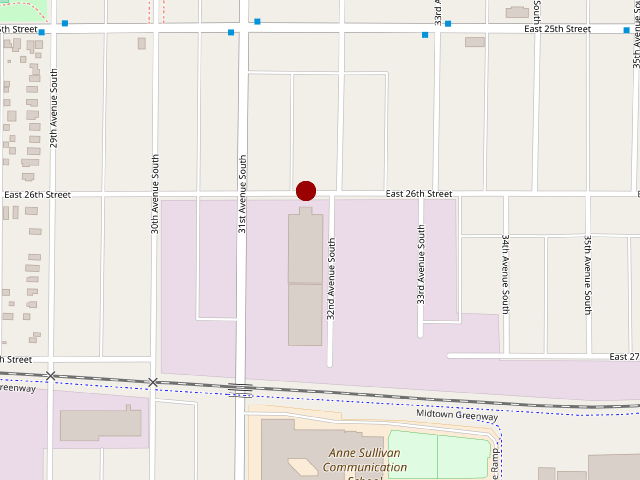
Address: 3119 E. 26th Street, Minneapolis, MN 55406
Check out the Wiki, our FAQs, or ask the Community on Discord
Contact us or Email us